
Why Does Your Video Always Buffer at the Worst Moment? Unveiling the Hidden Force Behind Global Streaming: HLS
Have you ever wondered what's actually happening behind that buffering circle? It is not just bad internet speed. It is a complex relay race called HLS.
Why Does Your Video Always Buffer at the Worst Moment? Unveiling the Hidden Force Behind Global Streaming: HLS
Picture this:
You’re sitting on the couch, holding your breath as you watch the World Cup final penalty shootout. Messi runs up, lifts his foot, ready to strike—suddenly, the screen freezes. A spinning circle appears in the center of the screen.
At that moment, you want to smash the TV, right?
 Everyone’s nightmare: the buffering circle at the crucial moment
We’ve all experienced this despair. But have you ever wondered what’s actually happening behind that damn “buffering circle”? It’s not just “bad internet speed.” It’s a complex relay race happening between your device, servers, and the global network.
And the star of this race is the protocol we’re discussing today—HLS (HTTP Live Streaming).
If you’ve ever used an iPhone, watched Netflix, browsed Twitch, or simply watched any video on a webpage on this planet, you’ve unknowingly used HLS. It’s the “air” of the streaming world—everywhere, yet rarely noticed.
Today, I’ll take you inside the HLS black box. Whether you’re a curious soul wanting to understand video principles, or a developer looking to build your own streaming platform, this article will be your ultimate guide from zero to hero.
What Is HLS? (Explained with Pizza)
Before HLS was born (around 2009), watching videos online usually meant downloading the entire file (like a massive MP4).
It’s like going to a restaurant and having the waiter shove an entire 20-inch pizza into your mouth.
- Problem 1: You have to wait until the pizza is fully baked before eating (waiting for download).
- Problem 2: If you’re full halfway through (internet disconnects), the rest of the pizza is wasted.
- Problem 3: If you suddenly want a different flavor (switch resolution), you have to order a whole new pizza.
HLS transformed “pizza shoving” into “conveyor belt sushi.”
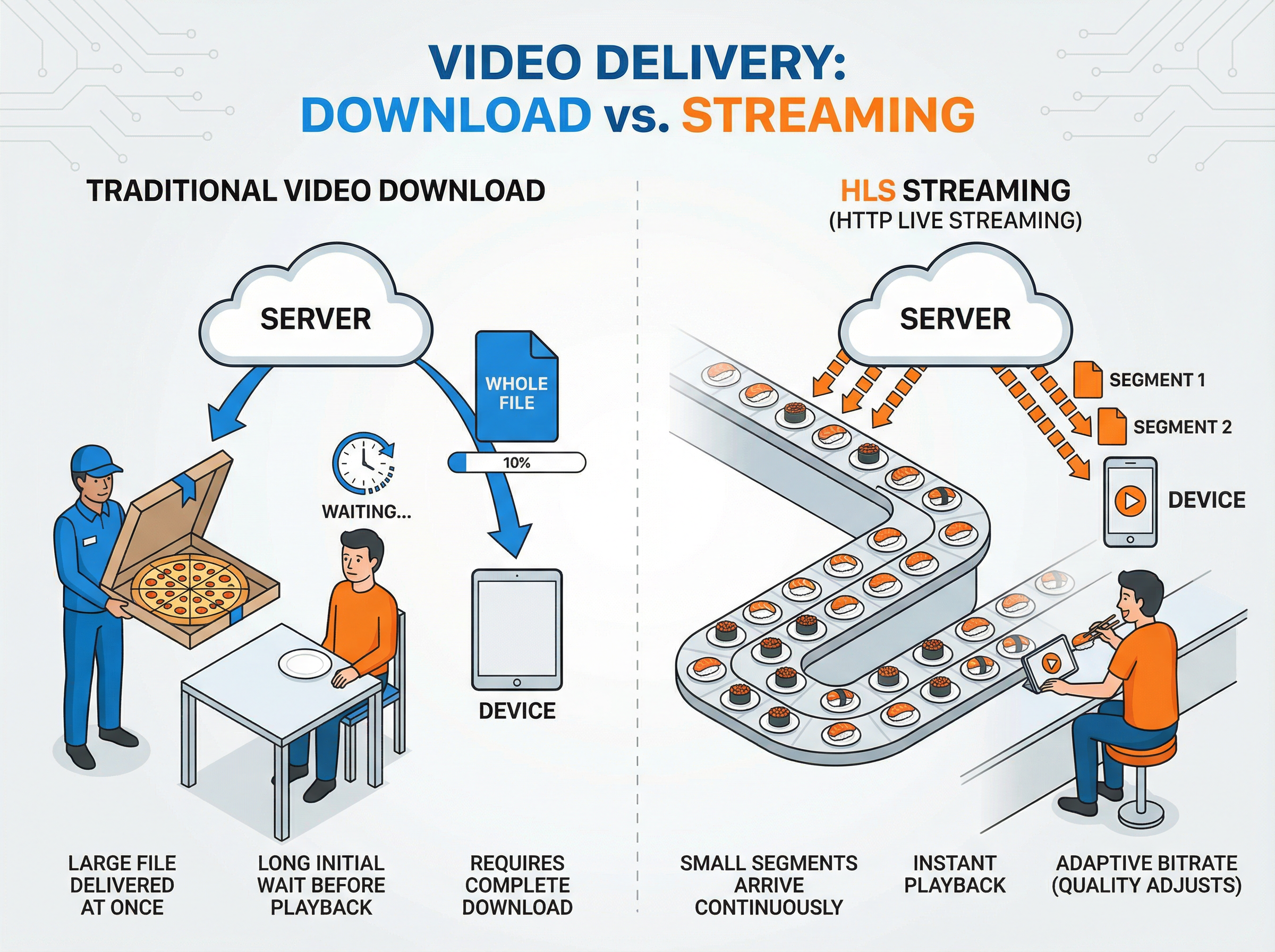 Left: Traditional “whole pizza” download mode. Right: HLS “conveyor belt sushi” streaming mode
The core logic of HLS is incredibly simple, with just two steps:
- Slicing: The server acts as a “big knife,” cutting a 2-hour movie into countless 10-second segments (usually
.tsfiles). - Menu (Playlist): The server generates an index file (
.m3u8) that tells the player: “The first slice is here, the second slice is there, the third slice…”
When you click play, your player (browser) is actually doing this:
- Download the menu (fetch the
.m3u8). - Download the first pizza slice (fetch the first
.tsfile). - Eat the first slice (play the video).
- While eating, quietly grab the second slice (preload).
This is why HLS is so powerful: It breaks down a massive download task into countless tiny HTTP requests.
The Iron Triangle Behind HLS
To make this process work, we need three roles working in perfect harmony:
1. The Chef (Server)
Responsible for encoding and slicing the raw video (like your camera feed or MP4 file). It continuously produces .ts video segments and updates the .m3u8 index.
2. The Waiter (CDN)
This is HLS’s biggest advantage. Because HLS segments are just ordinary static files (like images or HTML), they can be distributed using any standard web server (Nginx, Apache) and CDN worldwide.
- RTMP (the old protocol) requires special channels and is easily blocked by firewalls.
- HLS uses standard HTTP port 80, just like regular web browsing, with excellent penetration capability.
3. The Diner (Client)
Your phone, computer, or TV. It’s responsible for parsing the menu, downloading segments, and seamlessly stitching them together for playback.
- Apple devices: Native support (system-level integration).
- Android/PC: Usually requires a player (like ExoPlayer or hls.js).
Deep Dive: Dissecting an .m3u8 File
Don’t be scared off by technical jargon. An .m3u8 file is actually just a simple text file. Let’s look at a real example:
#EXTM3U
#EXT-X-VERSION:3
#EXT-X-TARGETDURATION:10
#EXT-X-MEDIA-SEQUENCE:0

#EXTINF:10.0,
segment0.ts
#EXTINF:10.0,
segment1.ts
#EXTINF:10.0,
segment2.ts

#EXT-X-ENDLIST
Get it? There are really only three parts:
- Header: Tells the player “I’m an HLS file, each segment is maximum 10 seconds.”
- Body: The specific segment list.
segment0.tsis the first segment,segment1.tsis the second. - Footer:
#EXT-X-ENDLISTmeans “the video ends here.” If you’re watching a live stream, you won’t see this tag because the list keeps updating!
Live vs On-Demand: The Two Faces of HLS
HLS supports both Video on Demand (VOD) and Live streaming, but they work slightly differently.
-
VOD (Video on Demand): The menu is fixed. Like going to a restaurant, the menu shows what’s available, and you can flip to the last page anytime (drag the progress bar to the end).
-
Live: The menu is dynamic (sliding window). Like watching a scrolling stock ticker. The server continuously kicks old segments out of the list and adds new ones. The player needs to re-download the
.m3u8every few seconds to check for new content.