
HLS Entry-Level Adventure: Delivering Video to Your Phone Like Food Delivery
Discover how HLS (HTTP Live Streaming) works through vivid metaphors. From slicing technology to M3U8 playlists and live server deployment, master the essentials of HLS technology in this complete guide for beginners.
HLS Entry-Level Adventure: Delivering Video to Your Phone Like Food Delivery
Opening Remarks: An Apple Story That Changed the Video World
Imagine this: one afternoon in 2007, Apple engineers were struggling with a problem: how to make the iPhone play video smoothly? At the time, Flash technology performed terribly on mobile devices—battery life leaked like a sieve, and performance was unbearable. So, Apple made a bold decision: we’ll build one ourselves!
Two years later, in 2009, HLS (HTTP Live Streaming) was born. Its core idea is brilliantly simple: Since sending one huge file at once is too difficult, let’s chop it into small pieces and deliver them one by one like food delivery!
This seemingly simple idea completely changed the game for internet video. Today, whether you are scrolling through TikTok, watching YouTube, or binge-watching Netflix, HLS is likely working silently behind the scenes.
Core Magic: Turning Video into “Delivery Sets”
 Left: Traditional “Big Truck Whole Transport”; Right: HLS “Courier Batch Delivery”
The Art of Slicing
Let me tell you a story first. Suppose you are moving house and have a huge refrigerator to transport. You have two choices:
Option A: Find a super-large truck to transport the entire refrigerator at once. Sounds grand, right? But the problems are:
- You have to wait a long time to find such a big truck.
- If you hit a traffic jam on the way, everything stops.
- If something goes wrong halfway, the whole refrigerator is ruined.
Option B: Disassemble the refrigerator into several parts and send each part via regular courier in batches. Like this:
- You can start shipping immediately.
- If one package is delayed, the others are delivered as usual.
- You can adjust the delivery method at any time based on road conditions.
HLS chooses Option B! It cuts the complete video file into small segments (usually 2-10 seconds each), and each segment is like an independent “courier package.” These segments are usually .ts files (MPEG-2 Transport Stream) or more modern .mp4 fragments.
The Menu: The Magical M3U8
Having sliced segments isn’t enough; you have to tell the player the order of these segments, right? This is the role of the M3U8 playlist—it’s like a delivery menu that details:
- What “dishes” are available (video segments)
- Where each “dish” is (URL address)
- In what order to “serve” (playback order)
- How long each “dish” takes to “eat” (duration)
Let’s look at a super simple M3U8 example:
#EXTM3U
#EXT-X-VERSION:3
#EXT-X-TARGETDURATION:10
#EXTINF:9.5,
segment001.ts
#EXTINF:9.5,
segment002.ts
#EXTINF:9.5,
segment003.ts
#EXT-X-ENDLIST
This is like a menu saying: “First dish 9.5 seconds, second dish 9.5 seconds, third dish 9.5 seconds, that’s all, enjoy!”
Adaptive Bitrate: Intelligent Gear Shifting
Here’s a super cool feature! HLS can prepare multiple copies of video with different qualities at the same time, just like a restaurant preparing small, medium, and large set meals.
When your internet speed is fast, the player automatically switches to the HD version; if the speed drops, it downgrades to SD to ensure you don’t buffer. The whole process is silky smooth, and you almost can’t feel the switch!
This is the role of the Master Playlist, which looks like this:
#EXTM3U
#EXT-X-STREAM-INF:BANDWIDTH=800000,RESOLUTION=640x360
low/index.m3u8
#EXT-X-STREAM-INF:BANDWIDTH=1400000,RESOLUTION=842x480
mid/index.m3u8
#EXT-X-STREAM-INF:BANDWIDTH=2800000,RESOLUTION=1280x720
high/index.m3u8
When the player sees this “Master Menu,” it cleverly chooses the most suitable “Sub-menu” based on your internet speed and screen size.
VOD vs. Live: The Difference Between Recorded and Live
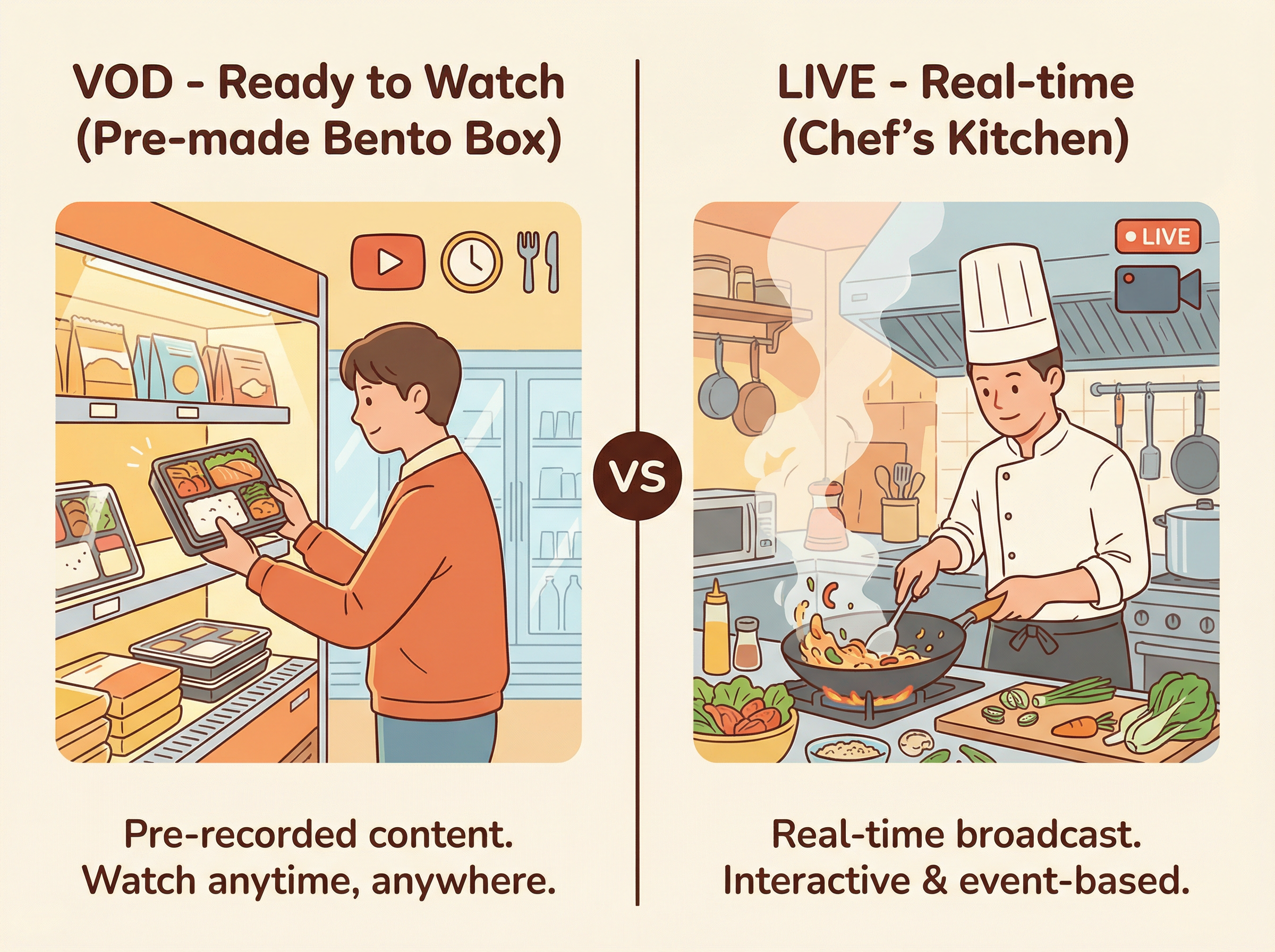 VOD is like a convenience store bento (available anytime); Live is like on-site cooking (made in real-time)
VOD: Pre-made Bento
Imagine buying a bento box at a convenience store. This bento:
- ✅ Is already made and can be bought at any time
- ✅ Content is fixed and won’t change
- ✅ You can eat it whenever you want
- ✅ You can fast-forward to the end to see if there’s a braised egg
Video on Demand (VOD) is just like this: The video is already sliced, the M3U8 list is generated, lying on the server waiting for you to watch. There will be an #EXT-X-ENDLIST tag at the end of the playlist, telling the player: “Bro, the video ends here, no more follow-up.”
Live: Made to Order
Now imagine you are watching a chef cook live:
- 🔴 The chef is cooking, and you are watching
- 🔴 The next dish hasn’t been made yet
- 🔴 You have to follow the chef’s pace
- 🔴 If you miss it, you miss it (unless there is a replay)
Live Streaming is this feeling! The key differences are:
- M3U8 is constantly updating: Every few seconds, the server adds newly sliced segments to the playlist.
- No end tag: Because the live broadcast is still in progress, there is no “finished” yet.
- Sliding Window: The playlist only keeps the latest few segments (e.g., the last 6 segments), and segments that are too old will be removed.
- Player keeps refreshing: It goes to the server every few seconds to get the latest M3U8 to see if there are new segments.
For example, a live M3U8 might look like this:
#EXTM3U
#EXT-X-VERSION:3
#EXT-X-TARGETDURATION:6
#EXT-X-MEDIA-SEQUENCE:12345
#EXTINF:6.0,
live_12345.ts
#EXTINF:6.0,
live_12346.ts
#EXTINF:6.0,
live_12347.ts
Notice, no #EXT-X-ENDLIST! And there is an #EXT-X-MEDIA-SEQUENCE:12345, which says: “Hey, the current first segment number is 12345.” Next time the player refreshes, it might start with 12346, and old segments are replaced by new ones.
Interesting thought time: Why doesn’t live streaming keep all segments? Because then the list would grow infinitely, and most viewers just want to watch what’s happening “now,” not start from the beginning!
HLS’s Status: Battling with Other Heroes
HLS is not a lone ranger in the streaming world; it has many competitors and brother protocols. Let’s compare it with several other “martial arts masters.”
Opponent 1: MPEG-DASH (The International Standard Hero)
Who is DASH?
- Full name: Dynamic Adaptive Streaming over HTTP
- The “orthodox” standard set by the international organization MPEG
- The concept is almost identical to HLS: Slicing + Adaptive + HTTP
Where are the main differences?
| Feature | HLS | MPEG-DASH |
|---|---|---|
| Origin | Apple’s private recipe | International standard feast |
| Apple Device Support | ⭐⭐⭐⭐⭐ Perfect | ❌ Basically unsupported |
| Android Support | ⭐⭐⭐⭐ Very Good | ⭐⭐⭐⭐⭐ Perfect |
| Playlist Format | M3U8 (Text) | MPD (XML) |
| Segment Container | TS or fMP4 | Mainly fMP4 |
| Codec Limits | Prefers H.264 | Codec freedom |
Plain English Translation: HLS is Apple’s “family secret recipe,” swimming freely on iPhone/iPad; DASH is the “international universal recipe,” more open but Apple doesn’t buy it. If your users mainly use Apple devices, choose HLS with your eyes closed; if you want to cover various platforms, you may need to prepare both.
Opponent 2: RTMP (The Fallen King)
RTMP’s Past Glory: In the Flash era, RTMP (Real-Time Messaging Protocol) was the hegemon of live streaming. It had:
- ⚡ Super low latency (1-3 seconds)
- 💪 Strong real-time capability
- 🎬 Full support from Flash Player
But times have changed:
- 💀 Flash died in 2020
- 📱 Mobile browsers don’t support it at all
- 🔒 Requires specialized streaming servers
- 🚧 Easily blocked by firewalls
HLS vs. RTMP is like Food Delivery vs. Dine-in:
| Dimension | HLS (Delivery) | RTMP (Dine-in) |
|---|---|---|
| Latency | 10-30s (Standard) 2-5s (Low Latency) |
1-3s |
| Coverage | Almost all devices | Only with specialized software |
| Deployment Difficulty | Simple (Ordinary Web Server) | Complex (Dedicated Server) |
| Network Friendliness | Excellent (HTTP penetrates everything) | Average (May be blocked) |
| Status | Rising | Setting Sun |
Current Best Practice: Streamers use RTMP to push to the server (because it’s stable and reliable), and the server converts it to HLS to distribute to viewers (because compatibility is good). This is called “taking the best of both worlds”!
Opponent 3: WebRTC (Real-time Interaction Expert)
WebRTC’s Specialties:
- 🚀 Latency is terrifyingly low (tens to hundreds of milliseconds)
- 🎤 Natively supports two-way communication
- 💻 Browser native support, no plugins needed
- 📞 Designed for video conferencing
HLS vs. WebRTC is like Concert Broadcast vs. Video Call:
HLS is suitable for:
- One person speaking, millions listening (One-to-Many)
- Can tolerate a few seconds of latency
- Needs CDN for large-scale distribution
- Examples: Sports events, concerts, recorded online courses
WebRTC is suitable for:
- Multiple people communicating with each other (Many-to-Many)
- Must be real-time (Latency < 1 second)
- Limited number of participants
- Examples: Video conferences, online diagnosis, live PK
Interesting Analogy: HLS is a radio station (one-way transmission, wide coverage), WebRTC is a conference call (two-way interaction, limited participants).
Technical Deep Dive: Unveiling HLS’s Internal Secrets
Okay, the previous parts were all “What” and “Why.” Now let’s talk about “How.” Don’t worry, I’ll continue to speak in plain language!
Encoding Format: The “Language” of Video
Video encoding is like a zip file format
Imagine you want to send a photo to a friend, but the original 10MB is too big. What do you do? Right, compress it into JPEG or WebP format. Video encoding is the same principle—compressing huge original video data into small files.
The most common combo for HLS is:
- Video Encoding: H.264/AVC (supported by almost all devices)
- Audio Encoding: AAC (good sound quality, excellent compatibility)
Why choose H.264?
- ✅ High compression rate (1 hour of video might only need 1-2GB)
- ✅ Hardware decoding (saves power, doesn’t overheat)
- ✅ Universally used (from iPhone to Android to Smart TVs)
Newcomer H.265 knocks on the door:
- 💪 Compression rate is double that of H.264 (half the size for the same quality!)
- ⚠️ But compatibility is poorer (old devices don’t support it)
- 💰 There are also patent fee issues
Practical Advice: Pursuing maximum compatibility? Use H.264. Pursuing bandwidth savings? Try H.265, but remember to prepare an H.264 backup.
Container Format: The “Packaging Box” of Video
Encoding solves “how to compress,” and container solves “how to package.”
TS (Transport Stream): The Classic Veteran
- 📦 Each small segment is an independent box
- 🛡️ Built-in fault tolerance (can still play even if a few packets are lost)
- 📺 Originated from digital TV technology
- ⚖️ But overhead is slightly larger (each segment has a complete header)
fMP4 (Fragmented MP4): The New Influencer
- ✨ More modern, higher efficiency
- 🔗 Needs an “initialization segment” (like a manual)
- 🤝 Compatible with DASH (one video works for both protocols)
- ⚡ Supports low latency tricks
Visual Metaphor:
- TS is like a self-heating hotpot; every box is complete (bowl, ingredients, heating pack all included).
- fMP4 is like IKEA furniture; first, there’s a manual (initialization segment), then parts are packed separately (media segments).
The Secret Language of M3U8
Remember the M3U8 “menu” mentioned earlier? Now let’s look at the “recipe syntax” of this menu in detail.
Basic M3U8 Anatomy:
#EXTM3U                          # File header: I am an M3U8 file!
#EXT-X-VERSION:3                 # Protocol version number
#EXT-X-TARGETDURATION:10         # Max segment duration not exceeding 10 seconds
#EXT-X-MEDIA-SEQUENCE:0          # Starting segment number

#EXTINF:9.9,                     # First segment: duration 9.9 seconds
segment0.ts                      # Segment filename

#EXTINF:9.9,                     # Second segment: duration 9.9 seconds
segment1.ts

#EXTINF:9.9,                     # Third segment
segment2.ts

#EXT-X-ENDLIST                   # End tag: No more follow-up
Advanced Version: Multi-bitrate Master Playlist:
#EXTM3U
#EXT-X-VERSION:6

# HD Version: 1920x1080, 5Mbps
#EXT-X-STREAM-INF:BANDWIDTH=5000000,RESOLUTION=1920x1080,CODECS="avc1.640028,mp4a.40.2"
high/playlist.m3u8

# SD Version: 1280x720, 2.5Mbps
#EXT-X-STREAM-INF:BANDWIDTH=2500000,RESOLUTION=1280x720,CODECS="avc1.64001f,mp4a.40.2"
medium/playlist.m3u8

# Smooth Version: 640x360, 800Kbps
#EXT-X-STREAM-INF:BANDWIDTH=800000,RESOLUTION=640x360,CODECS="avc1.42001e,mp4a.40.2"
low/playlist.m3u8

# Audio Only: 64Kbps
#EXT-X-STREAM-INF:BANDWIDTH=64000,CODECS="mp4a.40.5"
audio-only/playlist.m3u8
Decoding Key Information:
BANDWIDTH: Bitrate. Higher numbers mean better quality but also use more data.RESOLUTION: Resolution. 1920x1080 is the so-called “1080p.”CODECS: Codec information (an “ingredient list” for professional players).
Special Tags Bonanza:
#EXT-X-KEY:METHOD=AES-128,URI="https://example.com/key.php"
# 🔐 Encryption! Get the key to decrypt before playing.

#EXT-X-DISCONTINUITY
# ⚠️ Warning: The encoding parameters of the next segment have changed (e.g., switching resolution).

#EXT-X-PROGRAM-DATE-TIME:2025-12-31T14:30:00.000Z
# 📅 Timestamp: What moment in the real world this segment corresponds to.

#EXT-X-MAP:URI="init.mp4"
# 📋 fMP4 exclusive: This is the initialization segment, download this first!
Protocol Version Evolution
HLS is not static; it upgrades constantly like a phone system:
Versions 1-2 (Ancient Era):
- Basic VOD and Live functions
- No encryption, worrying security
Version 3 (Maturity):
- ➕ Added AES-128 encryption
- ➕ Supports floating-point duration (more precise)
- 🎯 Sufficient for most simple applications
Versions 4-5 (Rich Era):
- 🎵 Multi-audio track support (Chinese/English dubbing switch)
- 📝 Subtitle support
- 🎬 I-Frame list (Quick drag preview)
Versions 6-7 (Modern Era):
- 📱 Officially added fMP4 support
- 📜 RFC 8216 became the standard document
- 🔒 Stronger encryption options
Versions 8+ (Future Era):
- ⚡ Low Latency HLS (LL-HLS)
- 📦 Partial Segment
- 🚀 Latency drops to 2-5 seconds level
Version Selection Tip: Novices use Version 3; if you want fMP4 or low latency, use Version 7+.
Practical Deployment: Let HLS Run!
Theory is over; now for some practical action! Don’t worry, I’ll teach you step by step.
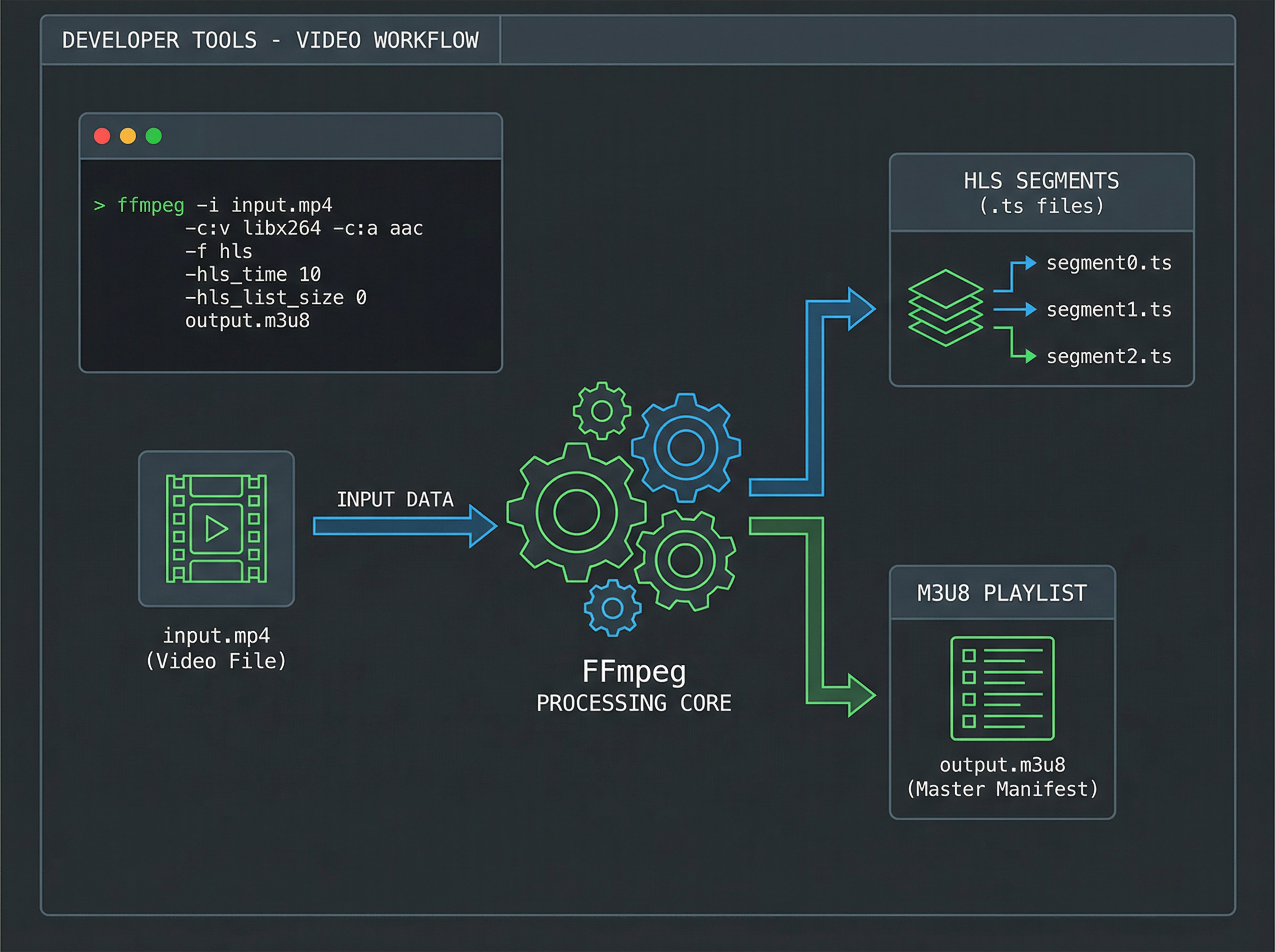 FFmpeg workflow converting MP4 to HLS segments and playlists
Task 1: Making HLS VOD with FFmpeg
Scenario: You have a movie.mp4 and want to convert it to HLS for website users to watch.
Tool: FFmpeg—The Swiss Army Knife of audio and video processing.
Done in one line:
ffmpeg -i movie.mp4 \
  -c:v libx264 -c:a aac \
  -hls_time 6 \
  -hls_playlist_type vod \
  -hls_segment_filename "segment_%03d.ts" \
  -f hls output.m3u8
Command Interpretation:
-i movie.mp4: Input file-c:v libx264: Video encoded with H.264-c:a aac: Audio encoded with AAC-hls_time 6: Each segment is 6 seconds-hls_playlist_type vod: This is a VOD file-hls_segment_filename: Segment naming rule-f hls: Output format is HLSoutput.m3u8: Generated playlist
After running, you will get:
output.m3u8          # Playlist
segment_000.ts       # 1st segment
segment_001.ts       # 2nd segment
segment_002.ts       # 3rd segment
...
Multi-bitrate Version (Preparing different qualities for users with different internet speeds):
# Generate Low Quality
ffmpeg -i movie.mp4 -c:v libx264 -b:v 800k -s 640x360 \
  -c:a aac -b:a 96k -hls_time 6 -f hls low/stream.m3u8

# Generate Medium Quality
ffmpeg -i movie.mp4 -c:v libx264 -b:v 1400k -s 960x540 \
  -c:a aac -b:a 128k -hls_time 6 -f hls mid/stream.m3u8

# Generate High Quality
ffmpeg -i movie.mp4 -c:v libx264 -b:v 2800k -s 1280x720 \
  -c:a aac -b:a 192k -hls_time 6 -f hls high/stream.m3u8
Then write a master.m3u8 by hand:
#EXTM3U
#EXT-X-VERSION:3
#EXT-X-STREAM-INF:BANDWIDTH=896000,RESOLUTION=640x360
low/stream.m3u8
#EXT-X-STREAM-INF:BANDWIDTH=1528000,RESOLUTION=960x540
mid/stream.m3u8
#EXT-X-STREAM-INF:BANDWIDTH=2992000,RESOLUTION=1280x720
high/stream.m3u8
Task 2: Building a Live Server
Scenario: You want to set up a live server for streamers to push streams and viewers to watch.
Solution: Nginx + RTMP Module
Step 1: Install Nginx-RTMP
# Ubuntu/Debian System
sudo apt update
sudo apt install nginx libnginx-mod-rtmp

# Or compile it yourself (omitted, many tutorials online)
Step 2: Configure Nginx
Edit /etc/nginx/nginx.conf, add:
rtmp {
    server {
        listen 1935;  # RTMP default port
        chunk_size 4096;

        application live {
            live on;
            record off;

            # Enable HLS slicing
            hls on;
            hls_path /var/www/hls;
            hls_fragment 2s;
            hls_playlist_length 10s;
        }
    }
}

http {
    server {
        listen 80;

        location /hls {
            types {
                application/vnd.apple.mpegurl m3u8;
                video/mp2t ts;
            }
            root /var/www;
            add_header Cache-Control no-cache;
            add_header Access-Control-Allow-Origin *;
        }
    }
}
Step 3: Create HLS Directory
sudo mkdir -p /var/www/hls
sudo chmod 755 /var/www/hls
Step 4: Start Service
sudo nginx -t  # Test configuration
sudo systemctl restart nginx
Step 5: Push Stream and Watch
Streamer uses OBS to push to:
rtmp://your_server_ip:1935/live/mystreamViewers visit:
http://your_server_ip/hls/mystream.m3u8🎉 Success! You now have a working live server!
Browser Playing HLS
Problem: Chrome/Firefox doesn’t natively support HLS?
Answer: Use the tool hls.js!
Quick Integration Code:
<!DOCTYPE html>
<html>
<head>
    <title>HLS Player</title>
</head>
<body>
    <video id="video" controls width="800"></video>

    <script src="https://cdn.jsdelivr.net/npm/hls.js@latest"></script>
    <script>
        const video = document.getElementById('video');
        const videoSrc = 'https://example.com/stream.m3u8';

        if (Hls.isSupported()) {
            // Use hls.js
            const hls = new Hls();
            hls.loadSource(videoSrc);
            hls.attachMedia(video);

            hls.on(Hls.Events.MANIFEST_PARSED, function() {
                console.log('Playlist loaded!');
                video.play();
            });

            hls.on(Hls.Events.ERROR, function(event, data) {
                console.error('Playback error:', data);
            });
        }
        else if (video.canPlayType('application/vnd.apple.mpegurl')) {
            // Safari native support
            video.src = videoSrc;
        }
        else {
            alert('Your browser does not support HLS playback');
        }
    </script>
</body>
</html>
It’s that simple! Thirty lines of code, cross-platform HLS player done!
CDN Acceleration: Smooth for Viewers Worldwide
Why do we need CDN?
Imagine your server is in Beijing, and a user in the US visits your live stream:
- 🐌 High latency (physical distance is far)
- 📉 Limited bandwidth (cross-border transmission is expensive)
- 💥 Server pressure is high (everyone accesses one machine)
What is CDN?
CDN (Content Delivery Network) is like a “video chain store”:
- 🌏 Deploy massive server nodes globally
- 📦 Cache your video to various places
- 🎯 Users automatically connect to the nearest node
- ⚡ Fast speed, low latency, server relaxed
Perfect Match of HLS and CDN:
-
Segment Caching Strategy:
.tsfiles: Long-term cache (e.g., 1 hour) ✅.m3u8files: No cache or short cache (a few seconds) ⚠️
-
Nginx Cache Configuration Example:
location ~ \.ts$ {
    root /var/www/hls;
    add_header Cache-Control "max-age=3600";  # Cache 1 hour
}

location ~ \.m3u8$ {
    root /var/www/hls;
    add_header Cache-Control "no-cache";  # No cache
}-
Mainstream CDN Recommendations:
- Alibaba Cloud CDN, Tencent Cloud CDN (Domestic)
- Cloudflare, Akamai (International)
- All have specialized HLS optimization options
Money Saving Tip: When users are few initially, use a regular Web Server + Cloudflare Free CDN, then upgrade to professional CDN when traffic grows.
Common Issues First Aid Kit
Issue 1: Latency is too high?
Symptoms: Live latency is 30 seconds, viewers see the ball game half a beat slower, poor experience.
Cause Analysis:
- Each segment 6 seconds, player buffers 3 segments = 18 seconds base latency
- Network transmission + encoding + CDN distribution ≈ add another 10-15 seconds
Solutions:
Plan A: Shorten Segment Duration
hls_fragment 2s;        # Change from 6s to 2s
hls_playlist_length 6s; # Keep 3 segments
✅ Latency drops to about 6-10 seconds ⚠️ But requests increase, server pressure increases
Plan B: Use Low Latency HLS (LL-HLS)
- Requires supported encoders and players
- Can drop to 2-5 seconds
- Complex configuration, but significant effect
Plan C: Change Protocol
- If must be within 1 second: Use WebRTC
- If 5 seconds is acceptable: Optimized HLS is enough
Issue 2: Inconsistent Playback Across Devices
Symptoms: iPhone plays fine, Android stutters or cannot play.
Troubleshooting Checklist:
-
Encoding Format Compatibility
# Check video encoding ffmpeg -i segment.ts # Ensure it is H.264 Main or High Profile # Ensure audio is AAC-LC -
Baseline Profile for Safety
ffmpeg -i input.mp4 \
  -c:v libx264 -profile:v baseline -level 3.0 \
  -c:a aac -b:a 128k \
  -f hls output.m3u8
Although compression rate is slightly worse, compatibility is best!
-
Test Matrix
- ✅ iOS Safari
- ✅ Android Chrome + hls.js
- ✅ PC Chrome + hls.js
- ✅ Smart TV built-in browser
Issue 3: Encrypted Video Leeching
Scenario: Your paid course video is stolen by others and put on their website.
Multi-layer Protection:
Layer 1: Referer Check
valid_referers none blocked yourdomain.com *.yourdomain.com;
if ($invalid_referer) {
    return 403;
}
Layer 2: AES-128 Encryption
# Generate key
openssl rand 16 > encrypt.key

# Create key info file
echo "https://yourdomain.com/getkey.php" > keyinfo.txt
echo "encrypt.key" >> keyinfo.txt

# FFmpeg encrypt segments
ffmpeg -i video.mp4 \
  -hls_key_info_file keyinfo.txt \
  -f hls encrypted.m3u8
Layer 3: Token Authentication
# Python example: Generate URL with token
import hashlib
import time

def generate_token(file, secret, expire_time):
    timestamp = int(time.time()) + expire_time
    sign = hashlib.md5(f"{file}{secret}{timestamp}".encode()).hexdigest()
    return f"?t={timestamp}&sign={sign}"

# URL becomes: /hls/video.m3u8?t=1704067200&sign=abc123...
Layer 4: Dynamic Key Rotation
- Different keys for each user, each viewing
- Keys expire periodically
- Implement with business backend
Issue 4: Live Stream Interruption?
Symptoms: Streamer push stops, viewer screen freezes.
Preventive Measures:
-
Streamer Backup Push
Main Push: rtmp://MainServer/live/stream
Backup Push: rtmp://BackupServer/live/stream
Software like OBS supports pushing multiple streams simultaneously.
-
Server Auto Reconnect
application live { live on; drop_idle_publisher 10s; # Disconnect if no data for 10s idle_streams off; # Keep stream active } -
Client Retry Mechanism
hls.on(Hls.Events.ERROR, function(event, data) { if (data.fatal) { switch(data.type) { case Hls.ErrorTypes.NETWORK_ERROR: console.log('Network error, trying to reconnect...'); hls.startLoad(); break; case Hls.ErrorTypes.MEDIA_ERROR: console.log('Media error, trying to recover...'); hls.recoverMediaError(); break; } } }); -
Monitoring and Alerting
- Monitor push status
- Check playlist update frequency
- Notify via SMS/Email immediately upon anomaly
Issue 5: High Traffic Live Server Crash
Symptoms: Thousands watching simultaneously, server CPU maxed out, severe lag.
Emergency Rescue:
-
Immediately Integrate CDN
- Map HLS file directory to CDN
- Viewer traffic borne by CDN
- Origin server only handles CDN origin requests
-
Nginx Optimization Configuration
worker_processes auto; worker_rlimit_nofile 65535; events { worker_connections 10240; use epoll; } http { sendfile on; tcp_nopush on; tcp_nodelay on; keepalive_timeout 65; # Enable gzip compression for .m3u8 gzip on; gzip_types application/vnd.apple.mpegurl; } -
Layered Architecture
Streamer Push → Origin Encoding Server → CDN Edge Nodes → ViewersOrigin server only responsible for encoding and slicing, distribution all to CDN.
-
Reduce Segment Size
- Drop from 1080p to 720p
- Lower bitrate
- Temporarily sacrifice quality for smoothness
Advanced Tips: Becoming an HLS Master
Tip 1: Implementing Ad Insertion
Want to insert ads in live streams? HLS has a way!
#EXTM3U
#EXT-X-VERSION:3
#EXTINF:6.0,
segment1.ts
#EXTINF:6.0,
segment2.ts

# Insert Ad Marker
#EXT-X-DISCONTINUITY
#EXTINF:15.0,
ad_1.ts
#EXT-X-DISCONTINUITY

#EXTINF:6.0,
segment3.ts
#EXT-X-DISCONTINUITY tells the player: “The encoding parameters of the following segments might be different, get ready!”
Tip 2: Multi-language Audio Tracks
Let viewers choose Chinese/English dubbing:
#EXTM3U
#EXT-X-MEDIA:TYPE=AUDIO,GROUP-ID="audio",NAME="Chinese",DEFAULT=YES,URI="audio_cn.m3u8"
#EXT-X-MEDIA:TYPE=AUDIO,GROUP-ID="audio",NAME="English",DEFAULT=NO,URI="audio_en.m3u8"

#EXT-X-STREAM-INF:BANDWIDTH=2000000,AUDIO="audio"
video.m3u8
The player will show language switching options!
Tip 3: Subtitle Support
#EXTM3U
#EXT-X-MEDIA:TYPE=SUBTITLES,GROUP-ID="subs",NAME="Simplified Chinese",DEFAULT=YES,URI="sub_cn.m3u8"
#EXT-X-MEDIA:TYPE=SUBTITLES,GROUP-ID="subs",NAME="English",URI="sub_en.m3u8"

#EXT-X-STREAM-INF:BANDWIDTH=2000000,SUBTITLES="subs"
video.m3u8
Subtitles are also separate M3U8s, can be in WebVTT format.
Tip 4: Quick Preview (I-Frame Playlist)
Show preview images when users drag the progress bar:
ffmpeg -i video.mp4 \
  -vf "fps=1/5" \
  -c:v mjpeg \
  -f hls \
  -hls_flags single_file \
  iframes.m3u8
Generate a list containing only keyframes; players can achieve silky smooth preview!
Future Outlook: HLS’s Next Stop
Low Latency HLS (LL-HLS)
New standard launched by Apple, core improvements:
- 📦 Partial Segments: Split 2s segment into 4 0.5s small chunks
- 🚀 Preload Hint: Server tells client “next segment is coming soon”
- ⚡ HTTP/2 Push: Server actively pushes, no need for client to request repeatedly
Effect: Latency drops from 15-30 seconds to 2-5 seconds!
CMAF Unifying the World?
Common Media Application Format attempts to unify HLS and DASH:
- Same fMP4 segments
- Two playlists (.m3u8 and .mpd)
- Encode once, use both protocols
Benefits: Save storage, save bandwidth, save encoding costs!
AI Empowering HLS
In the future, we might see:
- 🤖 AI selecting best bitrate in real-time
- 🎨 AI enhancing low bitrate image quality
- 🔮 AI predicting network jitter to buffer in advance
- 📊 AI analyzing viewer behavior to optimize CDN deployment
Conclusion: Your HLS Journey Has Just Begun
Congratulations on reading this far! Now you have:
- ✅ Understood the core principles of HLS
- ✅ Known how to deploy HLS services
- ✅ Able to solve common issues
- ✅ Mastered advanced tips
Next Steps:
- Hands-on practice: Use FFmpeg to convert a few videos.
- Build a test server: Run Nginx+RTMP.
- Read RFC 8216 document: Understand every tag deeply.
- Follow the community: HLS technology is still evolving.
Final Words: HLS seems complex, but the core idea is simple and elegant—break big problems into small problems, and use HTTP, the most universal protocol, to solve streaming transmission. This wisdom of “simplifying complexity” is exactly the beauty of technology.
Now, go create your own video streaming application! Whether it’s the next TikTok, YouTube, or your personal live room, HLS will be your good partner. 🚀